Project
RAG Research Agent
(Chroma + LangGraph + Tools)
This project presents a production-style Retrieval Augmented Generation (RAG) system built with LangGraph, LangChain, ChromaDB, and tool routing. The agent follows a knowledge-base-first reasoning policy: it first retrieves from a local vector database, then decides whether retrieval is sufficient, and only falls back to external search when the evidence is weak. The system exposes both a FastAPI backend and an interactive UI, making it suitable for demonstrating controllable LLM-agent workflows, tool usage, structured responses, and practical deployment patterns for AI research assistants.
Agent Pattern
KB-first RAG with tool routing
External Tool Policy
Web fallback only when retrieval is weak
Deployment Style
FastAPI backend + interactive UI
LLM Setup
Local vLLM-compatible model endpoint
Frameworks
LangGraph + LangChain
Retrieval Layer
ChromaDB + embeddings
UI + API
Interactive demo + FastAPI
Main Goal
Controllable tool-using LLM agent
What happens when “Live Demo” is clicked
The button opens the hosted Hugging Face demo for the RAG agent. When the page opens, you may need to wait a short time while the Space finishes building or waking up. After it is ready, click the app UI at the top, enter a natural-language research or technical question in the chat box, and submit it to run the demo.
The agent first queries the local knowledge base stored in a vector database. If the retrieved evidence looks strong enough, it answers directly from the knowledge base. If retrieval is weak, the reasoning flow can route to the external search tool as a fallback, then return a structured answer.
This behavior demonstrates that the project is not just a simple chat interface. It shows retrieval logic, reasoning control, tool usage, fallback policy, and practical AI system design for research-assistant scenarios.
Brief instructions for the demo
1. Open the live demo page.
2. Enter a research or technical question in the chat box.
3. The agent will first search its local knowledge base.
4. If local retrieval is weak, it can route to an external search tool.
5. The final answer is returned through the interactive UI.
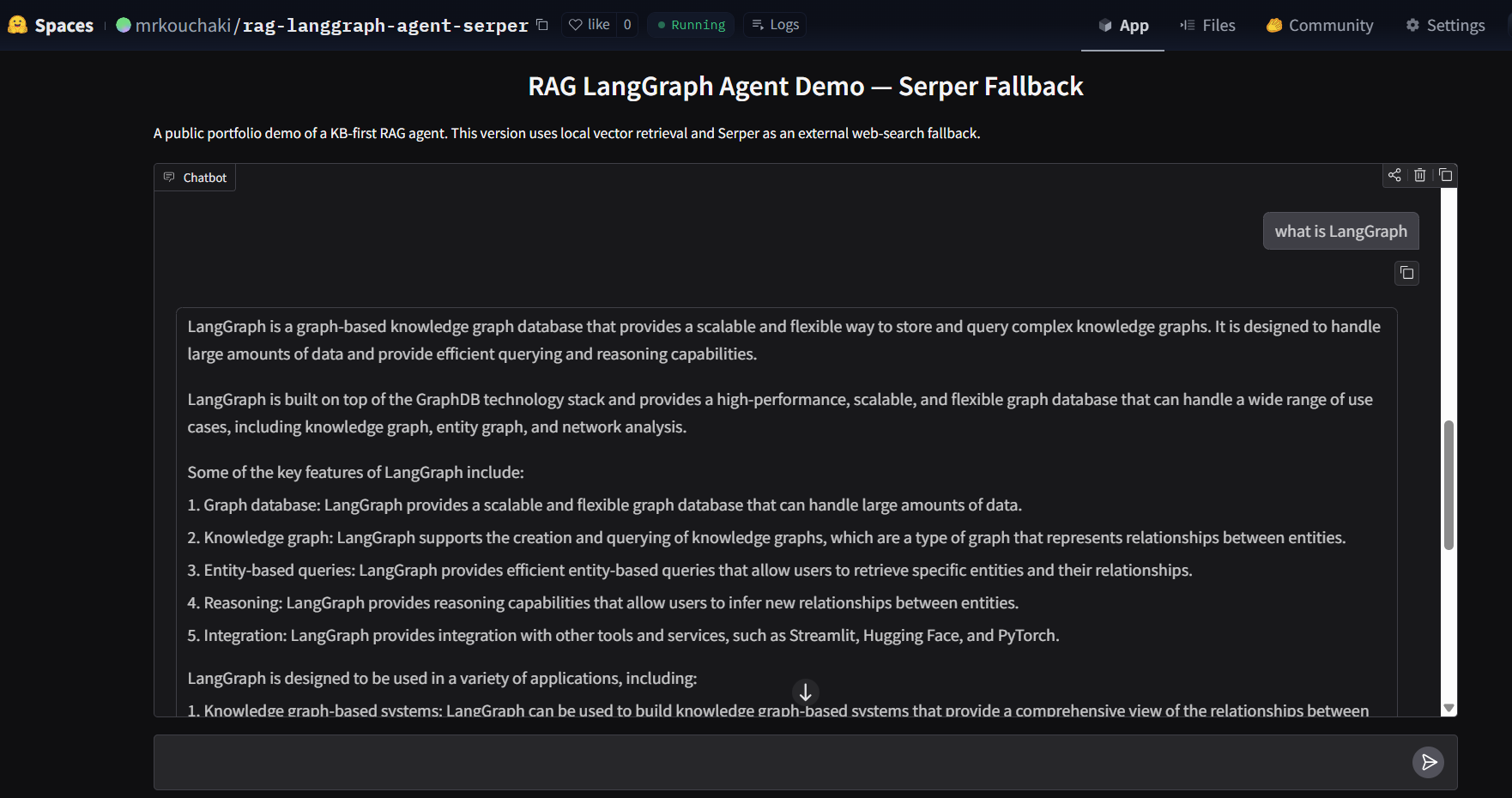
Demo interface
The screenshot below shows the public interface of the RAG LangGraph agent demo hosted online.
Architecture summary
User Question
↓
Knowledge Base Retrieval (ChromaDB)
↓
LangGraph Agent Decision
↓
Tool Routing
• KB Query
• Optional Web Search
• Final Response
Why this project matters
This project demonstrates an important modern AI system pattern: an LLM is not used alone, but is combined with retrieval, tool access, and a controlled reasoning flow.
From a portfolio perspective, it shows practical experience in agent design, vector retrieval, API-based deployment, UI integration, and orchestration logic rather than only prompt-based interaction.
These same patterns appear in enterprise copilots, research assistants, search systems, and internal knowledge agents.
Key features
- Knowledge-base-first retrieval policy
- LangGraph state-based reasoning flow
- Deterministic tool routing
- ChromaDB vector retrieval with embeddings
- Structured FastAPI backend responses
- Interactive UI for public demonstration
- External search fallback with controlled usage
Technology stack
- Python
- LangGraph
- LangChain
- ChromaDB
- SentenceTransformers
- FastAPI
- Streamlit / hosted demo UI
- vLLM-compatible local model serving
- Tavily or Serper external search integration
Implementation overview
The backend runs as a FastAPI service and exposes the agent logic through an API. The language model is served through an OpenAI-compatible endpoint, allowing local inference with a vLLM-based setup.
The reasoning controller is implemented using LangGraph. The graph manages the sequence of retrieval, evaluation, possible tool usage, and final response generation.
The front-end demo allows users to test the complete pipeline through a lightweight web interface, making the project suitable for portfolio presentation and technical interviews.